Ekko Studio: Android companion for local-first multi-agent AI workflows
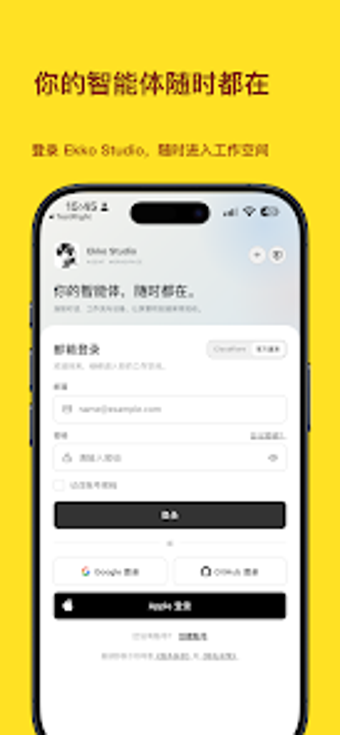
Ekko Studio, from Ekko Studio, is a local-first AI workspace that unifies multiple agent runtimes for developer workflows. The Android companion connects to a desktop or self-hosted server and lets users manage multi-agent sessions, view Markdown-rendered content, and process files on the move. It offers QR pairing, code highlighting, file and media handling, and stores conversation history in a local SQLite database. Designed for developers, AI researchers, and power users needing private mobile access to model-driven workflows.
Ekko Studio pulls multiple AI agents into developer workflows
The app functions as a mobile portal to a multi-agent environment, enabling group chats with @Agent mentions so distinct models collaborate inside a single thread. It supports several runtimes, including Hermes, Claude, and Grok, letting teams compare outputs or combine strengths. For coding and content tasks the app preserves code highlighting and Markdown rendering, which keeps technical outputs readable when you continue work away from the desktop.
How the mobile client fits into a desktop-driven workflow
The Android client pairs to a running desktop or self-hosted instance via a secure QR code, so mobile access mirrors the primary workspace rather than replacing it. Conversation history syncs from the desktop and sessions are kept in a local SQLite database, preserving continuity. File and media management lets you upload documents, images, and source files for agent processing, and visual workflows include human approval gates for staged automation.
Onboarding and daily use favour technically proficient users
Because the app requires a companion installation on PC or server, setup and ongoing coordination suit developers and researchers who manage their own infrastructure. The interface exposes agent thought recording for transparency and code formatting for review, features that reward familiarity with model-driven debugging. Templates or guided wizards are not mentioned, so newcomers should expect an initial learning curve tied to the desktop environment and model configuration.
Compatibility and mobile performance hinge on your backend
The app supports cross-device synchronization and delegates heavy model execution to the desktop or server, which centralizes compute and preserves mobile responsiveness. It can process files across local and remote backends and render rich content on Android, but runtime variety and reliability depend on the connected agent implementations. For teams comparing multiple providers, the app consolidates outputs without forcing model-specific UIs.
A specialist tool best suited to technically capable developers and researchers
For professionals who manage their own servers and need consistent access to multi-model workflows, the app delivers continuity, control, and readable technical output on mobile. Those seeking a standalone, turn-key mobile AI client should consider other options. Ekko Studio rewards setup effort by keeping model coordination coherent across devices, making it a practical choice for power users comfortable with backend management.